You look at your lock screen more than any other image in your life. Somewhere between 100 and 150 times a day, according to most estimates. That is more often than you look at your spouse, your children, or the sky.
Putting a Bible verse there is one of the simplest things you can do with a phone. It costs nothing, takes two minutes, and means the first thing you see when you reach for the device is Scripture instead of a notification.
Here is how to do it well, and how to go one step further.
Set it up on iPhone
Option A: a verse wallpaper (static)
- Save a verse image to your Photos (see sources below, or make your own).
- Open Settings → Wallpaper → Add New Wallpaper.
- Tap Photos and choose the image.
- Pinch to position, then tap Add → Set as Wallpaper Pair (or Customize Home Screen to keep a plain home screen).
Option B: a verse-of-the-day widget (changes daily)
- Long-press your lock screen until Customize appears.
- Tap Customize → Lock Screen.
- Tap the widget strip below the clock and choose a Bible app’s verse-of-the-day widget (YouVersion, Bible.is and others offer one).
- Tap Done.
Option B is better for most people: a verse you see every day for a month stops registering, while a verse that changes stays visible.
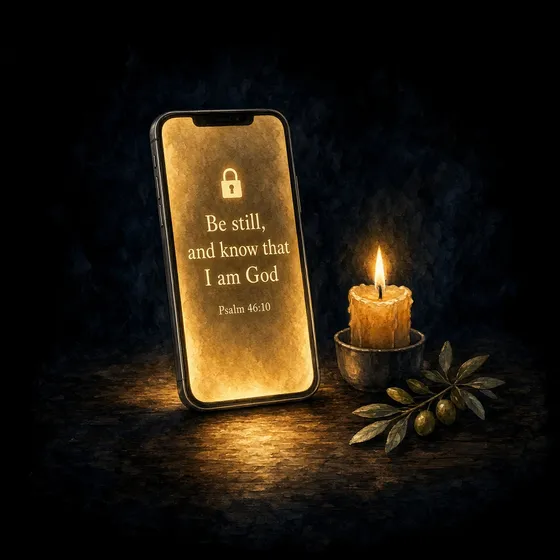
Tip: Put a plain, dark wallpaper behind the widget so the text is readable. The night-sky aesthetic is not just pretty; it makes small text legible.
Set it up on Android
Steps vary slightly by manufacturer (Samsung, Pixel, etc.), but the shape is the same:
- Save a verse image to your gallery.
- Long-press an empty area of the home screen → Wallpaper & style (or Wallpapers).
- Choose My photos / Gallery and pick the image.
- Select Lock screen (or both), position it, and tap Set.
For a rotating verse, most Bible apps offer a home-screen widget; Samsung’s lock screen also supports widgets on recent One UI versions via Settings → Lock screen → Widgets.
Where to get verse wallpapers
- YouVersion (Bible app): tap any verse → Image, choose a background, save. Free and endless.
- Canva: search “Bible verse phone wallpaper.” Free templates in the right dimensions (1170×2532 for most iPhones).
- Make your own: open any photo editor, start with a plain dark or navy background, add one line of text in a serif font, centered, generous margins. Simple beats decorated. It has to be readable at a glance.
- Unsplash / Pexels: free photos (night skies, candles, mountains) to put text over.
Whatever you use, keep the text short. Two lines maximum. You are glancing, not reading.
30 verses that work on a lock screen
Short enough to read in one glance, strong enough to redirect the next thirty seconds.
For focus and attention
- “Be still, and know that I am God.” — Psalm 46:10
- “Set your minds on things above, not on earthly things.” — Colossians 3:2
- “I will set before my eyes no vile thing.” — Psalm 101:3
- “Whatever you do, do it all for the glory of God.” — 1 Corinthians 10:31
- “I will not be mastered by anything.” — 1 Corinthians 6:12
- “Teach us to number our days.” — Psalm 90:12
For peace
- “Do not be anxious about anything.” — Philippians 4:6
- “My peace I give you.” — John 14:27
- “Cast all your anxiety on him because he cares for you.” — 1 Peter 5:7
- “The Lord is my shepherd; I lack nothing.” — Psalm 23:1
- “In quietness and trust is your strength.” — Isaiah 30:15
For strength
- “I can do all this through him who gives me strength.” — Philippians 4:13
- “The Lord is my strength and my shield.” — Psalm 28:7
- “Be strong and courageous.” — Joshua 1:9
- “My grace is sufficient for you.” — 2 Corinthians 12:9
- “Those who hope in the Lord will renew their strength.” — Isaiah 40:31
For the morning
- “This is the day the Lord has made.” — Psalm 118:24
- “His mercies are new every morning.” — Lamentations 3:23
- “In the morning, Lord, you hear my voice.” — Psalm 5:3
- “Satisfy us in the morning with your unfailing love.” — Psalm 90:14
For temptation
- “Watch and pray so that you will not fall into temptation.” — Matthew 26:41
- “Flee from evil desires and pursue righteousness.” — 2 Timothy 2:22
- “Lead us not into temptation.” — Matthew 6:13
- “Create in me a pure heart, O God.” — Psalm 51:10
For identity
- “You are precious in my eyes.” — Isaiah 43:4
- “I have called you by name; you are mine.” — Isaiah 43:1
- “Fearfully and wonderfully made.” — Psalm 139:14
- “Nothing can separate us from the love of God.” — Romans 8:39
- “Where your treasure is, there your heart will be also.” — Matthew 6:21
- “Seek first his kingdom.” — Matthew 6:33
The honest limitation
A verse on the lock screen is a reminder. Reminders work for about a week.
Then something happens that psychologists call habituation: you stop seeing it. The verse is still there; your brain has filed it under “wallpaper” and your thumb is already swiping up to Instagram. Ask anyone who has done this for a month whether they still read their lock screen verse. Most will admit they do not.
This is not a reason not to do it. It is a reason not to stop there.
Go one step further: a lock screen that does something
The lock screen’s real power is not the image. It is the moment: the hundred-plus times a day you reach for the phone, half-consciously, looking for something. Right now that moment is an on-ramp to the feed. It could be an on-ramp to God.
That is the idea behind PrayerMax. Instead of a verse you look past, you get a prayer you have to pray. You choose the apps that pull you away (Instagram, TikTok, YouTube, whatever it is). They lock. When you reach for one, PrayerMax opens with a short prayer, a Bible story, or a prayer written for what you are carrying that day. You pray it. Then the app opens.
The verse stops being decoration and becomes a door. Over a few weeks, the reflex that used to open the feed starts opening a prayer instead.
Set the wallpaper today; it costs nothing. Then, if you want the lock screen to actually change something, put a prayer behind it.